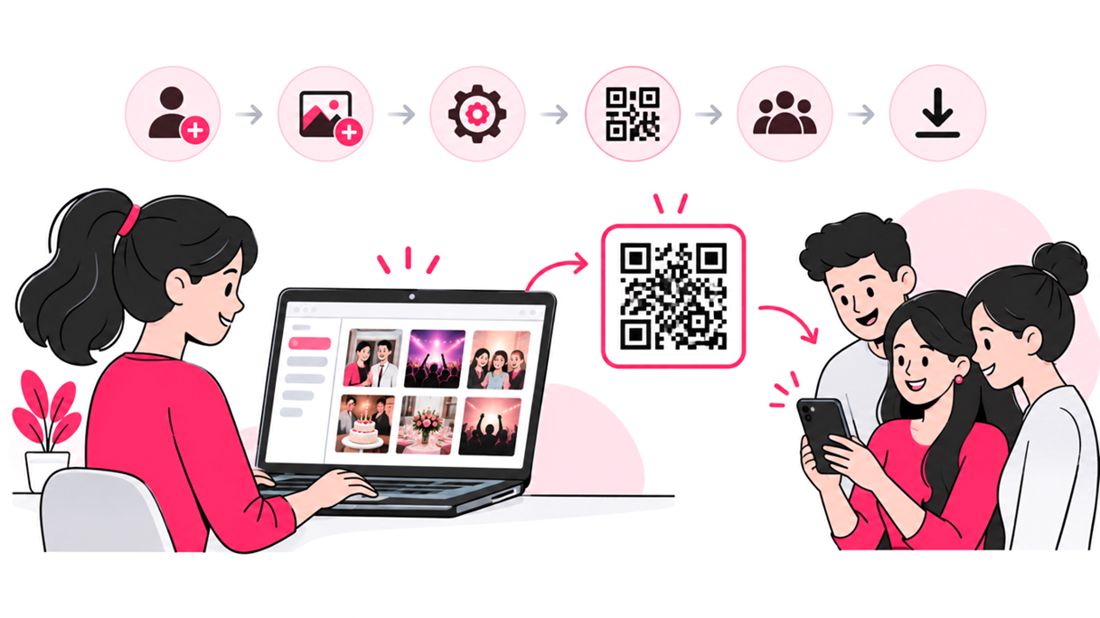

The most efficient way to share event photos with clients is to replace manual email delivery with face recognition photo sharing. Instead of sorting hundreds or thousands of images, attaching files, and sending multiple emails, photographers can upload an event gallery to a secure online photo-sharing platform. AI-powered face recognition helps guests find photos featuring them, while clients can browse, view, and download images through a private link or QR code.
For event photographers, wedding photographers, corporate event organizers, and professional photography studios, this workflow can reduce repetitive administration, improve photo delivery, and create a smoother client experience.
Why emailing event photos becomes a problem
Email works well for a handful of previews or a small set of final images. It becomes harder to manage when a client expects a complete gallery from a wedding, conference, school event, fundraiser, or multi-day celebration.
Common problems include:
- Attachment limits: Large image files may exceed an email provider’s attachment limit, forcing photographers to compress files or split delivery across messages.
- Repeated requests: Guests often ask for specific images, and the photographer has to search through folders and send them individually.
- Slow discovery: A client may need to scroll through hundreds of images to find a few photos of themselves, their team, or their family.
- Version confusion: Follow-up emails can create uncertainty about which images are final, edited, or newly added.
- Poor scalability: The work of delivering photos can grow with every additional guest, team, or event location.
- Limited gallery experience: Email threads are not designed for browsing an organized collection, viewing updates, or downloading a complete gallery.
The issue is not that email is useless. It is that email is a poor system for distributing a large, searchable event photo library.
What is face recognition photo sharing?
Face recognition photo sharing uses image-matching technology to group or retrieve photos that appear to feature the same person. In an event gallery, a guest can use a supported face-search workflow to find relevant images without knowing the filenames or manually browsing every photograph.
A typical workflow looks like this:
- The photographer uploads the edited event photos to a gallery platform.
- The platform processes images using its face-recognition feature.
- The organizer shares a private gallery link or QR code with attendees.
- Guests click a selfie to find photos that match them.
- Guests view or download available images according to the gallery’s settings.
This changes the delivery model from “photographer sends each person their photos” to “photographer publishes a gallery that helps people find their own photos”.
Email delivery vs. face recognition galleries
| Task | Email-based delivery | Face recognition photo sharing |
|---|---|---|
| Delivering a large event gallery | Often requires links, multiple messages, or file-size compromises | Upload once and share gallery access |
| Finding one guest in a large collection | Manual search or individual sorting | Face-based discovery can surface likely matches |
| Sharing with hundreds of attendees | Repetitive distribution and follow-up | One link or QR code can serve the group |
| Handling new uploads | Send another email or update a thread | Add photos to the gallery |
| Guest access | Depends on email recipients and attachment/link setup | Controlled through gallery permissions and privacy settings |
| Best use case | A few selected images or private client previews | Larger events with many attendees and photos |
The right choice depends on the job. Email remains practical for contracts, delivery notifications, a small set of proofs, or a private selection of images. A gallery is usually easier to manage when the goal is to share hundreds or thousands of event photos with a wider audience.
How to switch from emailing photos to a searchable gallery
1. Organize the delivery before uploading
Start with a consistent folder structure and a clear naming convention. For example, separate a conference by day or session, or divide a wedding into ceremony, portraits, reception, and candid moments.
Before uploading:
- Remove duplicate exports and accidental test shots.
- Confirm the intended edits and export quality.
- Check that the gallery does not include images that should remain private.
- Separate client-only images from any collection intended for all attendees.
- Agree on the expected delivery date and download permissions.
A well-organized upload makes the gallery easier to navigate even when face search is available.
2. Upload the full set to a photo-sharing platform
Choose a service designed for event photo delivery rather than using an email inbox as the gallery. Consider upload capacity, supported file types, download quality, access controls, storage duration, and how the platform handles newly added photos.
SnapSeek, for example, is built around event photo sharing with AI face recognition. A host can upload event photos to a collection, share access through a link or QR code, and let guests find and download photos without requiring each guest to create an account. The host can also invite contributors to add photos where that workflow is useful.
The important operational difference is that the organizer manages one shared collection instead of creating a separate email delivery for every guest.
3. Set access and privacy rules
A shareable gallery should not automatically mean a public gallery. Decide who can open the collection and what each visitor can see or download.
Before sharing, review:
- Whether the gallery is link-accessible, password-protected, or restricted in another way.
- Whether guests can browse all event photos or only photos matched to them.
- Whether contributors can upload to the gallery.
- How long photos remain available and how deletion requests are handled.
- Whether the event requires consent, notices, or additional safeguards for face recognition.
These settings matter especially for school events, youth sports, corporate gatherings, and private celebrations. Tell attendees how photos will be used, avoid uploading images without appropriate authorization, and provide a clear contact for privacy concerns.
4. Share one link or QR code
Once the gallery is ready, send one clear announcement instead of a series of individual photo emails. Include the event name, gallery link or QR code, access instructions, download guidance, and the date the collection will be available until, if applicable.
For an in-person event, place the QR code on signage, event programs, table cards, or a follow-up message. For a conference or corporate event, include the gallery link in the post-event email or attendee portal.
Keep the message practical. Explain what guests can do, whether they need to sign in, and how to report a photo that is missing or incorrectly matched.
5. Keep the gallery updated and close the loop
If the event has multiple photographers or attendee contributions, set expectations for when additional photos will appear. A shared gallery can reduce repeated email requests, but only if people know where to return for updates.
After delivery, check for common issues:
- Are guests able to open the link on mobile devices?
- Can they download images at the intended quality?
- Are access settings working as expected?
- Are any images incorrectly grouped or missing from face search?
- Is there a process for removal requests or inappropriate uploads?
This short quality check can prevent a wave of support messages later.
What to look for in an event photo-sharing tool
Not every online album is designed for large events. Compare platforms based on the workflow you need rather than a long feature checklist.
| Feature | Why it matters |
|---|---|
| AI face recognition | Helps attendees locate relevant photos in a large gallery |
| Private collections and access controls | Helps keep event images available to the intended audience |
| Link and QR-code sharing | Makes access straightforward at venues and in follow-up messages |
| High-quality downloads | Gives guests usable images rather than only small previews |
| Bulk upload and organized collections | Reduces friction when delivering large events |
| Contributor uploads | Can bring photos from approved team members into one place |
| Clear retention and deletion settings | Helps organizers plan how long images remain accessible |
| Mobile-friendly guest experience | Lets attendees find photos on the devices they already use |
| Transparent pricing and limits | Helps photographers estimate the cost of each event |
SnapSeek supports event collections, face recognition, link and QR-code access, privacy settings, downloads, and contributor uploads. Review the current product settings and terms before choosing a platform, because exact capabilities and limits can change.
Does face recognition always find the right photo?
No. Face recognition is a discovery aid, not a guarantee that every match will be correct or that every photo will be found.
The US National Institute of Standards and Technology (NIST) has documented that face-recognition performance varies by algorithm and by image conditions. Its evaluations discuss both false negatives, where a system fails to match the same person across images, and false positives, where it incorrectly associates different people. Image quality can affect results, too.
In event photography, matching may be harder when:
- A face is turned away from the camera or partly covered.
- Lighting is poor, uneven, or strongly backlit.
- The person appears very small in a wide group shot.
- The image is blurred or has a low-resolution face.
- Several people look similar or appear close together.
Set expectations clearly: guests should use face search to speed up discovery, then check the results before downloading or sharing them. Keep full-gallery browsing available when appropriate, and make it easy to contact the organizer about a missing image or incorrect match.
When email still makes sense
Moving away from email-based photo delivery does not mean eliminating email from the workflow. Email remains useful for sending a gallery announcement, delivering a few selected images, confirming permissions, or communicating with the client privately.
A practical division of work is:
- Use email for client communication, contracts, approvals, and a link to the finished gallery.
- Use a photo gallery for distributing a large event collection.
- Use face recognition to help attendees find relevant images in that collection.
- Use clear access settings to control what guests can view, download, or contribute.
This keeps email as the communication channel, rather than forcing it to function as a photo-management system.
FAQ
How can photographers share event photos with clients without emailing every image?
Upload the edited images to an online photo gallery and send the client one link. For events with many attendees, a platform with face recognition can help guests find photos featuring them without the photographer sending each person a separate selection.
What is face recognition photo sharing?
Face recognition photo sharing uses automated facial matching to help group or find images that may feature the same person. It can make large event galleries easier to search, but matches are not guaranteed and should be checked.
Is face recognition better than Google Drive or Dropbox for event photos?
It depends on the workflow. Google Drive and Dropbox can be useful for file storage and sharing folders. A dedicated event photo-sharing platform may offer a more guest-focused experience, including face-based discovery, QR-code access, and gallery controls.
Can guests find their photos with a QR code?
A QR code can take guests to a shared gallery on a compatible platform. SnapSeek supports face recognition so guests can then use its search process to find likely matches. The QR code provides access; it does not perform the recognition itself.
Do guests need to create an account to view event photos?
That depends on the platform and the organizer’s settings. SnapSeek allows guests to access a collection through a link or QR code without creating an account.
Conclusion
Email is useful for communication, but it becomes inefficient when photographers must distribute a large event gallery one person at a time. A searchable online gallery with face recognition gives clients and guests a more direct way to discover photos, while links and QR codes simplify access.
The best workflow combines organized uploads, clear permissions, accurate expectations, and responsible privacy practices. Explore SnapSeek to see how face recognition, event collections, and simple gallery sharing can fit into your photo delivery process.