Event photo sharing is easiest when guests can access a gallery quickly, find relevant pictures without scrolling through hundreds or thousands of files, and download images without installing an app or creating an account. For photographers and event organizers, a reliable workflow combines QR-code access, mobile-friendly galleries, face recognition, clear privacy settings, and straightforward download options.
The goal is not simply to upload a folder of images. It is to make the right photos easy to discover while keeping delivery manageable for the person responsible for the gallery.
Why Event Photo Sharing Often Becomes Complicated
A busy event can produce hundreds or thousands of images. Guests may remember a group photograph, a candid moment, or a speaker on stage, but they usually do not know the filename or when the photographer captured it.
Traditional delivery methods can create friction:
- Email attachments: Unsuitable for sending large collections to many people.
- Shared cloud folders: Useful for file storage, but guests may need to browse folders manually.
- Social media albums: Convenient for discovery, but not always suitable for controlled access or high-resolution delivery.
- One large gallery: Keeps everything together but can become difficult to navigate as the collection grows.
A well-designed event photo sharing workflow reduces the steps between asking, “Where are the photos?” and finding the picture someone wants.
1. Make the Gallery Accessible with a QR Code
A QR code is one of the simplest ways to share event photos in person. Organizers can place it on welcome signage, table cards, presentation slides, event programmes, or post-event thank-you messages.
Guests scan the code with their phone camera and open the gallery in a web browser. With SnapSeek, guests can access a collection through a QR code or direct link without downloading an app or creating an account.
Where QR-Code Photo Sharing Works Well
- Weddings: Display a code near the reception entrance or on table signage.
- Conferences: Add the gallery link to presentation slides or attendee follow-up emails.
- School events: Share a code through approved parent communications.
- Sports tournaments: Place it at registration or include it in team communications.
- Corporate events: Add it to digital signage or post-event recap emails.
Use a short instruction beside the code, such as “Scan to view event photos.” Test the code on different phones before printing, confirm that it opens the correct collection, and make it large enough to scan easily.
QR access makes the gallery easier to reach, but it does not automatically make a collection private. If an event contains sensitive images, configure appropriate access controls and explain who can view or download the photos.
2. Help Guests Find Their Own Pictures with Face Recognition
A gallery link solves access. It does not necessarily solve discovery. When guests must scroll through a large event album, they can miss relevant photos or abandon the search.
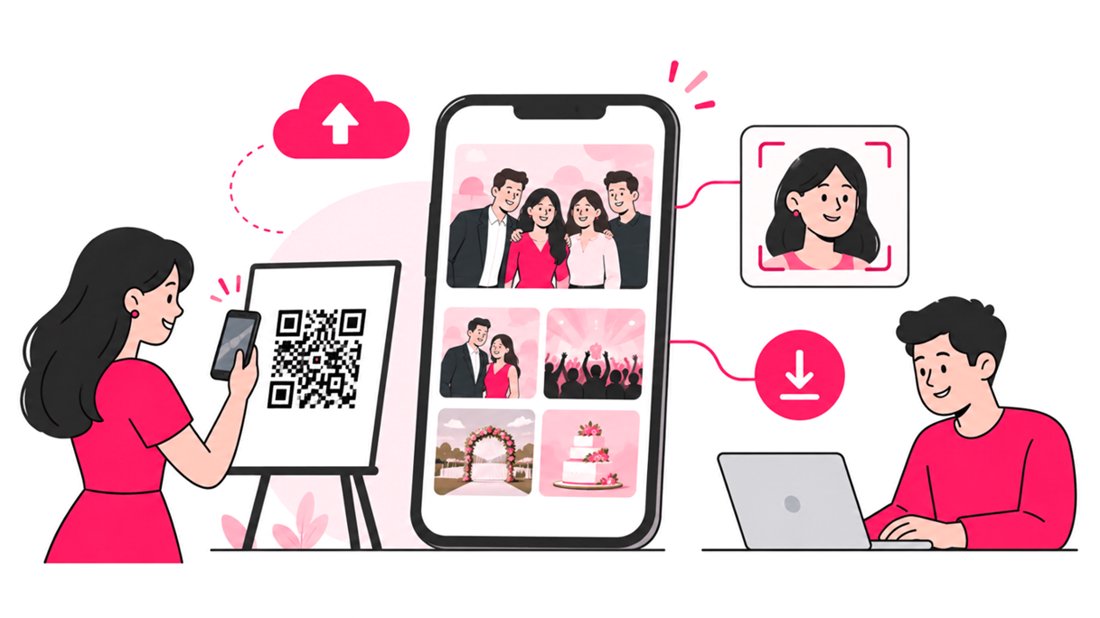
Face-recognition photo sharing offers another way to find pictures. With SnapSeek, guests can open a collection, provide a selfie as a search reference, and view photos in which the system detects a match. This helps guests locate images without knowing filenames or manually searching the entire gallery.
How Face-Recognition Photo Sharing Works
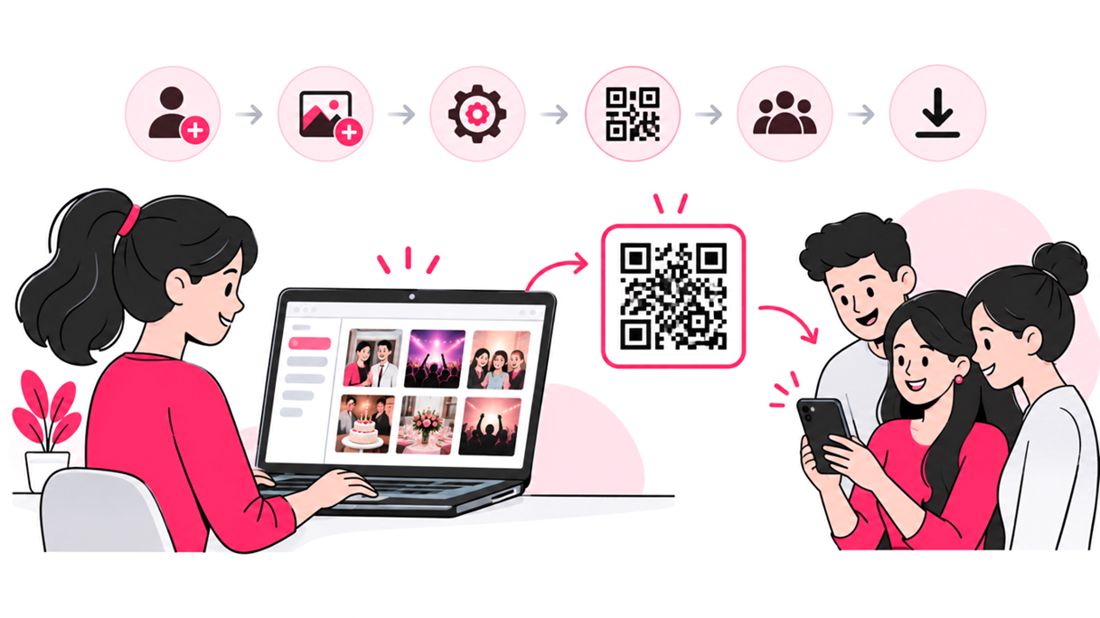
- The photographer uploads event photos to the collection.
- The platform detects and indexes faces in uploaded images.
- The organizer shares the gallery link or QR code.
- A guest opens the collection and uses a selfie to search.
- The guest reviews matching images and downloads the photos they want.
Results depend on factors such as image quality, face visibility, pose, occlusion, and lighting. Face matching should be treated as a discovery aid rather than a guarantee that every relevant photo will be found. Guests should still have a way to browse the wider collection when appropriate.
Face Recognition vs. Manual Photo Browsing
| Task | Manual Gallery Browsing | Face-Recognition Search |
|---|---|---|
| Find a particular guest | Scroll through images | Search using a selfie |
| Discover candid photos | Inspect images individually | Surface potential matches more quickly |
| Find group photographs | Browse the gallery manually | Search for people where multi-face search is supported |
| Handle imperfect results | Guest evaluates each image | Guest reviews the returned matches |
| Best use | Small collections and general browsing | Large collections requiring personal photo discovery |
For more detail, read AI Photo Matching Vs Manual Galleries.
3. Choose the Right Gallery Access and Privacy Settings
Easy sharing should not mean unrestricted sharing. Different events have different expectations: a public festival may want broad access, while a private celebration or school event may require additional controls.
SnapSeek supports private collections, link-based access, optional password protection, guest visibility controls, and permissions for invited contributors. Organizers should select settings based on the audience and the type of images being shared.
A Practical Privacy Checklist
- Decide who should be able to open the gallery.
- Use a password when the event calls for an additional access barrier.
- Review whether guests can view all photos or only relevant search results.
- Limit upload access to trusted contributors.
- Explain how long the gallery and its photos will remain available.
- Tell guests whom to contact if they want an image removed.
A shareable link can be forwarded, so link-only access should not be treated as identity verification. For sensitive events, assess whether stronger access controls are needed before distributing the QR code publicly.
4. Make Downloading Straightforward
The guest experience does not end when a photo appears on screen. Guests may want to save a single image, download a selection, or keep an entire set of event photographs.
A good event photo delivery process should make download options obvious and explain what quality guests will receive. SnapSeek supports batch downloads and ZIP-file generation, which can be useful when people want several images at once.
| Requirement | Useful Workflow Choice | Why It Matters |
|---|---|---|
| Save one image | Provide a clear individual download option | Reduces confusion for casual guests |
| Save multiple images | Offer batch or ZIP downloads where supported | Avoids repeating the same action for every photo |
| Protect a private event | Configure access and download permissions | Keeps sharing aligned with event expectations |
| Deliver paid files | Explain previews, purchase steps, and final file delivery | Sets clear expectations for buyers |
| Keep a gallery available | Set a retention period and communicate it | Helps guests know when to download |
If you sell event photographs, distinguish between preview files and purchased deliverables. State whether previews are watermarked, what resolution buyers receive, how delivery works, and whether the purchase covers personal or commercial use.
SnapSeek also offers a paid-download workflow with automated email delivery after purchase, depending on the plan and configuration.
5. Organize Large Event Galleries Before Sharing
A little organization before publication can prevent confusion later. For conferences, festivals, tournaments, and multi-day weddings, consider dividing the collection into useful folders or sections, such as:
- Ceremony and reception
- Speakers and sessions
- Team or group portraits
- Behind-the-scenes moments
- Day one, day two, and day three
- Official highlights
Use names guests can understand rather than internal production labels. If you are delivering photographs for several teams or locations, establish a consistent naming convention before uploading.
SnapSeek includes folder organization, allowing teams to structure collections rather than leaving every image in one undifferentiated stream. A separate highlights section can also help guests find key moments without replacing access to the full gallery.
For more workflow ideas, explore Organize Photos from Large Events.
6. Make the Gallery Feel Like Part of the Event
The gallery is another touchpoint between a photographer, organizer, and audience. A confusing or generic handoff can make even excellent images harder to use.
Depending on the configuration, SnapSeek offers custom guest messages, logos, page themes, watermarking, and links to a photographer’s website or social profiles. These features can help maintain a consistent presentation while giving guests useful next steps.
Keep customization practical:
- Put the main instruction near the top of the gallery.
- Use a recognizable business or event identity.
- Make the QR code and link easy to find.
- Explain whether guests should search by selfie, browse, or use both options.
- Keep download and privacy instructions concise.
- Check the page on a phone, not only on a desktop.
For live events, a gallery slideshow can also display selected images on a venue screen. Consider whether photos should appear immediately or be reviewed first, especially when the event includes children, confidential work, or attendees who may not expect their images to be displayed publicly.
7. Plan the Photo-Sharing Workflow Before Event Day
The most reliable systems are tested before guests arrive. A simple checklist helps photographers avoid last-minute access problems and makes the process easier for event staff to explain.
Before the Event
- Create the collection and confirm its privacy settings.
- Upload a small test batch and check how images appear.
- Test the QR code and direct link on different phones.
- Confirm that face search and downloads work as expected.
- Prepare signage and a one-sentence instruction for guests.
- Agree with the organizer on who can upload, approve, or remove images.
During the Event
- Put the QR code where guests can easily see it.
- Assign someone to answer basic access questions at larger events.
- Check that the shared link opens correctly.
After the Event
- Upload the edited photographs.
- Review gallery organization, visibility, and download permissions.
- Send the gallery link to attendees who were not present when the QR code was displayed.
- Communicate the retention period and any download deadline.
- Review guest feedback and improve the process for the next event.
8. Match the Sharing Method to the Event
No single delivery method suits every event. The best choice depends on the size of the collection, the audience, privacy expectations, and whether the goal is broad browsing or personal photo discovery.
| Event Type | Recommended Approach | Key Consideration |
|---|---|---|
| Wedding | QR code, face search, private gallery, clear download instructions | Guests want candid and group photos |
| Conference | QR access, folders by session, optional slideshow | Attendees may search for speakers or networking photos |
| School event | Controlled access and carefully reviewed permissions | Consider children’s privacy and parent expectations |
| Sports event | QR access, organized team folders, face search where appropriate | Guests may need to locate specific participants |
| Corporate event | Branded gallery, categorized photos, defined access | Confirm internal communications and image-use policies |
| Public festival | Visible QR signage and scalable gallery organization | Plan for large traffic and clear photo-use notices |
FAQ
How do you share event photos with guests?
Upload the photos to an online gallery, then share its link or QR code through signage, email, or event communications. Choose a gallery that works on mobile devices and offers clear browsing and download options.
How can guests find their photos without scrolling?
A face-recognition gallery can let guests search using a selfie rather than manually browsing every image. Results can vary with image quality and face visibility, so broad gallery browsing may still be useful.
Can guests access event photos without downloading an app?
Yes. Browser-based photo-sharing platforms such as SnapSeek let guests open a gallery from a QR code or direct link without installing an app. SnapSeek also does not require guests to create an account to access the collection.
Is QR-code photo sharing secure?
A QR code is a convenient access method, not a security control by itself. Use suitable gallery permissions or password protection, and remember that anyone who receives a shareable link may be able to forward it.
What is the best way to share thousands of event photos?
Use a gallery that supports large collections, organized folders, search, and batch downloads. Face-recognition search can make it easier for guests to discover their own photos, while folders and highlights help everyone browse.
How long should an event photo gallery stay online?
Choose a retention period based on the event, client agreement, and privacy needs. Tell guests how long the gallery will remain available and give them enough notice to download images before it expires.
Conclusion
Easy event photo sharing depends on more than uploading images. Guests need a quick way into the gallery, a practical way to find relevant photos, reliable download options, and clear information about privacy and availability.
QR codes reduce access friction, face recognition can improve personal photo discovery, and sensible organization makes large galleries easier to navigate. With browser-based access, guest-friendly search, customizable galleries, and download controls, SnapSeek gives photographers and organizers tools to build a more considered photo-sharing workflow.
Explore SnapSeek’s features to see which options fit your next event.