We have all been there. You host a beautiful event. Maybe it is a wedding, a milestone birthday, or a corporate retreat. You hire a photographer, or perhaps you take hundreds of high-quality photos yourself.
Then comes the question: “How do I send these to everyone?”
For the last decade, the default answer has been Google Photos. It is free (mostly), it is on everyone’s phone, and it is familiar.
But just because something is the default doesn’t mean it is the best. In fact, for large groups and professional events, Google Photos has glaring limitations that can turn your photo sharing experience into a logistical nightmare.
Enter SnapSeek.
SnapSeek is not a storagelocker; it is a dedicated event sharing platform. It uses advanced AI to solve the specific problems that event hosts face: privacy, speed, and ease of access.
If you are looking for the best way to share event photos in 2026, you need to understand the difference between a cloud drive and a smart gallery. This guide will break down SnapSeek vs Google Photos, comparing them feature by feature to help you decide which tool deserves your memories. For a full side-by-side breakdown, visit our dedicated SnapSeek vs Google Photos Comparison Page.
The “Findability” Problem: Doom Scrolling vs. Instant Discovery
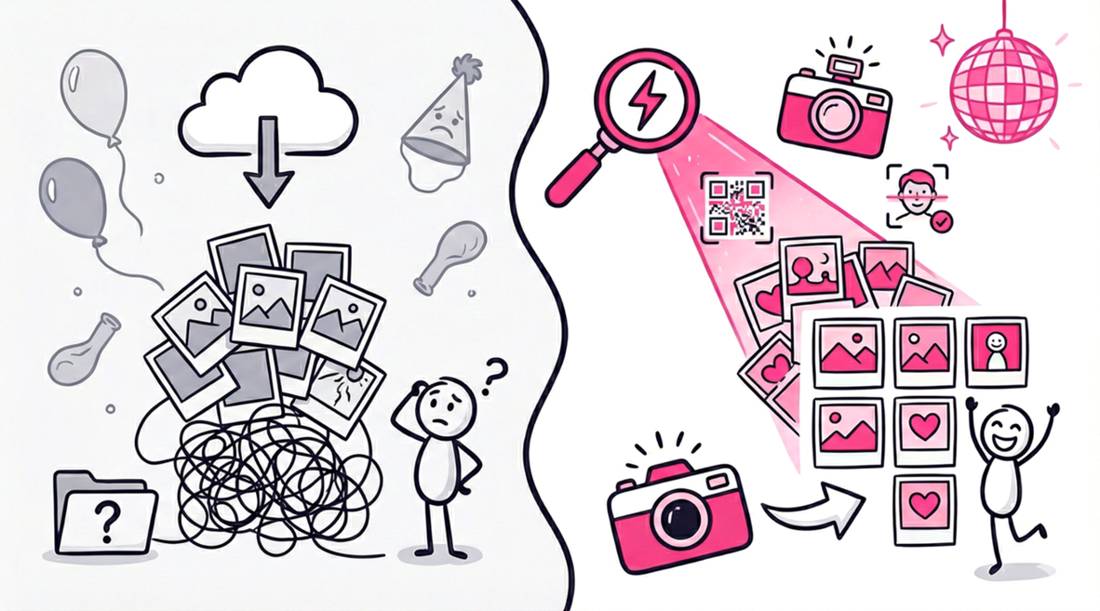
The single biggest pain point in sharing photos with a large group is volume. If you upload 1,000 photos from a wedding to a shared folder, you are asking every single guest to play “Where’s Waldo?”
The Google Photos Experience: The Linear Scroll
Google Photos is a timeline. When you share an album, guests engage in what we call “doom scrolling.”
- The friction: They have to scroll past hundreds of photos of strangers, food, and decor to find the three photos they are actually in.
- The result: Most guests give up. They glance at the first 20 photos and close the tab. The engagement is low because the effort required is high.
- The privacy issue: To find their own photos, they have to look at everyone else’s.
The SnapSeek Experience: AI Face Recognition
SnapSeek changes the paradigm from “browsing” to “searching.”
- The mechanics: When a guest opens a SnapSeek link, they are prompted to take a selfie.
- The magic: SnapSeek’s Face Recognition technology instantly filters the entire gallery. In milliseconds, it presents only the photos where that guest appears.
- The result: Instant gratification. Guests find their photos immediately, meaning they are far more likely to download and share them.
Winner: SnapSeek (for speed and user experience).
Privacy: Who Sees What?
Privacy is no longer optional. In an era of AI scraping and data breaches, people are rightfully cautious about where their face appears online.
Google Photos: All or Nothing
Google Photos generally operates on binary permissions.
- Private: Only you can see it.
- Shared: Anyone with the link can see everything. There is very little middle ground. If you share a link to a corporate event album, every attendee can scroll through every other attendee’s photos. This is often a violation of professional boundaries and personal privacy.
SnapSeek: Granular Control
SnapSeek understands that different events have different rules. It offers a suite of Privacy Levels that give you total control.
- View All OFF: This is a game changer for corporate events or schools. You can disable the ability to browse the full gallery. Guests can only see their own face-matched photos.
- Password Protection: You can lock specific collections with a password, while keeping the main collection open.
- No Indexing: SnapSeek galleries are designed to be private silos, not public social networks.
Winner: SnapSeek (for advanced security and control).
The Guest Experience: Apps and Accounts
How much friction are you willing to put on your guests?
Google Photos: The Account Wall
- The Barrier: While many people have Google accounts, not everyone does. And even those who do often struggle with switching between personal and work accounts to view a link.
- The “Join” Prompt: To interact with an album (like, comment, or add to their library), Google aggressively pushes users to sign in. This “login wall” creates a drop-off point where non-tech-savvy guests simply abandon the process.
SnapSeek: Frictionless Browser Access
- No App Needed: SnapSeek lives entirely in the browser. Guests do not need to download an app.
- No Account Needed: Guests do not need to create a SnapSeek account to view their photos. They scan a QR code or click a link, and they are in.
- Universal: It works perfectly on iOS, Android, Desktop, and Tablets. It respects the “Grandma Test” - if your grandmother can scan a QR menu, she can use SnapSeek.
Winner: SnapSeek (for accessibility).
Image Quality: Compression vs. High-Res
You hired a professional photographer for a reason. You want the details to be sharp.
Google Photos: The Compression Trap
Unless you are paying for extended storage plans, Google Photos often compresses images to save space (“Storage Saver” mode). Even at “Original Quality,” sharing large batches can be cumbersome, and downloading full-resolution files on a mobile device can be a multi-step headache involving zip files.
SnapSeek: Professional Delivery
SnapSeek is built for professionals.
- High limits: It supports files up to 30MB each.
- Zero Compression: The file you upload is the file the guest downloads.
- Prints: Guests get the print-ready quality they need to frame their memories.
Winner: Tie (Google Photos is fine for casual use, but SnapSeek ensures professional consistency).
Metadata and Business Value
If you are a photographer or an event organizer, photos are marketing assets.
Google Photos: A Dead End
When a user views a photo on Google, they are in Google’s ecosystem. There is no branding. There is no lead capture. You are sending traffic to a trillion-dollar company instead of your own business.
SnapSeek: A Brand Builder
SnapSeek turns your gallery into a marketing engine.
- Watermarking: You can automatically apply your logo to every photo in the Public / View All collection. When guests share these photos on Instagram, your brand travels with them.
- Email Capture: You can gate the gallery with Email Capture. “Enter your email to view your matches.” This allows you to build a database of attendees for future marketing or newsletters.
- Custom Messages: Display a welcome note with your website link or a specific hashtag.
Winner: SnapSeek (by a landslide).
The “Host-Only” Workflow vs. Collaborative Chaos
This is a philosophical difference in how the platforms operate.
Google Photos: Collaborative by Default
Google encourages “Collaboration.” Guests can add their own photos to your album.
- The Upside: You get photos from everyone.
- The Downside: Your carefully curated wedding album gets cluttered with blurry, dark, duplicate shots from your guests’ phone. You lose editorial control.
SnapSeek: The Curated Gallery
SnapSeek is Host-Upload Only.
- The Philosophy: The host (or professional photographer) is the curator. You upload the best shots. You control the narrative.
- The Result: A polished, professional gallery that looks high-end. It ensures that every photo a guest sees meets your quality standards.
Winner: SnapSeek (if you value quality control).
Real-World Scenarios: The Difference in Action
To truly understand the impact of your platform choice, let’s look at how these two tools perform in common event scenarios.
Scenario A: The 200-Guest Wedding
With Google Photos: You create a shared album and print a QR code for the tables.
- The Glitch: Guests scan the code but are asked to “Sign in to join.” Half of the older guests don’t know their Google password and give up.
- The Chaos: The guests who do join start uploading their own photos. Your professional shots are now mixed with blurry, dark photos of the floor and half-eaten cake.
- The Result: A disorganized mess that doesn’t reflect the elegance of your day.
With SnapSeek: You print a custom SnapSeek QR poster.
- The Smooth Entry: Guests scan the code. No login is required.
- The Magic: They instantly see professional photos of themselves. They download them in full resolution.
- The Control: You upload the professional shots the next day. The gallery remains pristine, curated, and beautiful.
Scenario B: The Corporate Conference
With Google Photos: You send a link to all 500 attendees.
- The Privacy Breach: The link is “View All.” This means the CEO can see the photos of the interns partying at the after-party. It means competitors (if forwarded the link) could see who attended.
- The Reputation Risk: It feels unprofessional to send a generic Google link for a high-ticket event.
With SnapSeek: You enable “View All: OFF”.
- The Professionalism: Attendees scan a code. They only see their own headshots and networking photos.
- The Security: They cannot browse the gallery. If they send the link to a colleague, that colleague will only see their own face matches (or nothing, if they weren’t there). The privacy of your attendee list is preserved.
The Hidden Cost of “Free” (Storage Limits)
One detail often overlooked is the storage cap.
- Google Photos: Your 15GB of free storage is shared across Gmail and Drive. A single wedding gallery (800 photos at 20MB each) is roughly 16GB. You will instantly hit your cap, block your emails, and be forced into a monthly subscription just to keep the album live.
- SnapSeek: The storage is dedicated to the event. You pay for the service of the smart gallery, not for an arbitrary cloud locker rental. You aren’t penalized for high-resolution quality.
| Feature | Google Photos | SnapSeek |
|---|---|---|
| Finding Photos | Manual Scrolling | AI Face Search (Selfie) |
| Privacy | Shared = Public to Link Holders | View All OFF / Face-Only access |
| Guest Access | Requires Google Login often | No Login / No App |
| Branding | None | Watermarks & Welcome Screen |
| Marketing | None | Email Capture |
| Upload Control | Collaborative (Messy) | Host-Only (Curated) |
| Ideal For | Personal Backup | Events & Groups |
FAQ
Do guests need a Google account to view SnapSeek photos?
No. Unlike Google Photos, which often forces a login, SnapSeek is completely open-access for guests (unless you add a password). They just scan and view.
Is SnapSeek free?
SnapSeek offers a free trial with credits. For full events, it operates on a pay-per-event or credit model.
Can I use SnapSeek for permanent backup?
SnapSeek is designed for sharing and delivery (hosting for 1 year), whereas Google Photos is better suited for long-term personalized backup.
Does SnapSeek compress my photos?
No. We deliver your full-resolution files (up to 30MB), so your guests can download print-quality images, which Google Photos often compresses.
Conclusion
Google Photos is an incredible tool for personal backup. It is great for storing your vacation photos or backing up your camera roll.
But when it comes to sharing with a group, it is the wrong tool. It lacks the privacy controls, the speed, and the professional features required for modern events.
SnapSeek is purpose-built for the moment where “My Photos” becomes “Our Photos.” It respects the privacy of your guests, saves them time with AI, and presents your event with the polish it deserves.
Don’t let your best memories get lost in a digital scrolling marathon. Switch to a smart gallery.
Ready to upgrade your photo sharing experience? Check out SnapSeek’s pricing and facilitate your first AI-powered event today.