It happens all the time. You are looking for a way to share photos from your wedding or corporate event. You type “Snap…” into the search bar. Google suggests two very similar names.
Snapseed and SnapSeek.
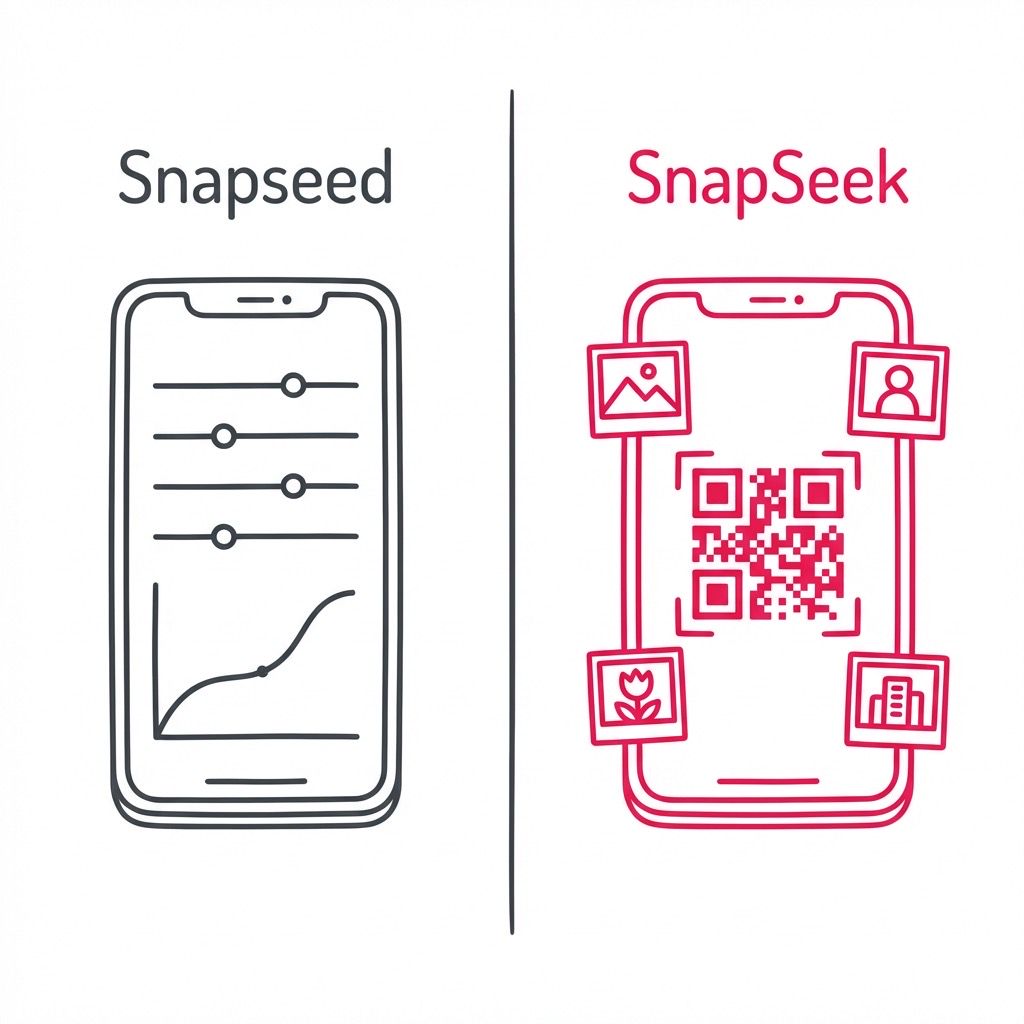
They sound alike. They both deal with photos. But that is where the similarity ends. One is a powerful tool for editing a single image to perfection. The other is a revolutionary platform for sharing thousands of event photos instantly using AI.
If you are an event photographer or organizer, knowing the difference is critical. Choosing the wrong tool can leave you with a beautiful photo that no one sees, or a gallery that takes weeks to deliver.
In this SnapSeek app review and comparison, we will clear up the confusion. We will compare SnapSeek vs. Snapseed so you know exactly which tool belongs in your workflow.
The Quick Answer: One Edits, The Other Shares
If you are in a rush, here is the breakdown.
Snapseed is for editing. It is a mobile app by Google that lets you tweak brightness, remove blemishes, and add filters to individual photos. You use it before you are ready to show your work to the world.
SnapSeek is for sharing. It is an AI-powered platform for event photographers. It uses face recognition to sort thousands of images. It lets guests find their own photos instantly with a selfie. You use it after you have taken the shots.
Here is a side-by-side comparison of their primary functions.
| Feature | Snapseed (Google) | SnapSeek (Event Platform) |
|---|---|---|
| Primary Function | Photo Editing & Retouching | Photo Sharing & Delivery |
| Target User | Hobbyists & Mobile Editors | Event Photographers & Hosts |
| Core Technology | Image Processing Filters | AI Face Recognition |
| Output | Single Revised JPG | Online Digital Gallery |
| Platform | Mobile App (iOS/Android) | Web Browser (No App Needed) |
| Cost | Free | Free Trial / Professional Plans |
| Best For | Fixing a selfie | Delivering large event photos |
You do not choose between them. You likely need both. But you need them for very different stages of your job.
What is Snapseed? The Editor in Your Pocket
Snapseed has been around for over a decade. It was acquired by Google and became the gold standard for mobile photo editing. It is designed for the individual creator. When you take a photo on your phone that looks a bit flat, you open Snapseed.
You can adjust the “Ambience” to bring out shadow detail. You can use the “Healing” tool to remove a stray trash can from the background. You can add a vintage “Grainy Film” look. It is a fantastic tool for what it does. It puts photoshop-like power in your pocket.
However, Snapseed has limits. It is a “one-at-a-time” tool. You cannot edit 500 photos at once. And more importantly, you cannot share galleries with it.
If you edit a photo in Snapseed, it stays on your phone until you manually send it to someone. It does not create a link. It does not host a website. It does not use facial recognition to identify the people in the picture.
That is where the frustration starts for event professionals. You might search for “SnapSeek” hoping to find a sharing solution, land on “Snapseed,” and wonder why you can only see brightness sliders.
What is SnapSeek? The Engine for Event Photography
SnapSeek is built for a completely different purpose. It solves the biggest pain point in the events industry: photo distribution.
Imagine you just shot a corporate gala with 300 guests. You have 2,000 photos.
In the old days, you would edit them and upload them to a Google Drive folder. Then you would email a link to the organizer. The organizer would email it to the staff.
Then the nightmare begins.
Guests have to click the link. They have to scroll through 1,999 photos of strangers just to find the one photo of themselves. Most guests give up. They never see your work. The photos sit in the cloud, unseen and unshared.
SnapSeek changes that entire workflow using Artificial Intelligence.
How SnapSeek Works
SnapSeek is not a photo editor. It is a photo finder.
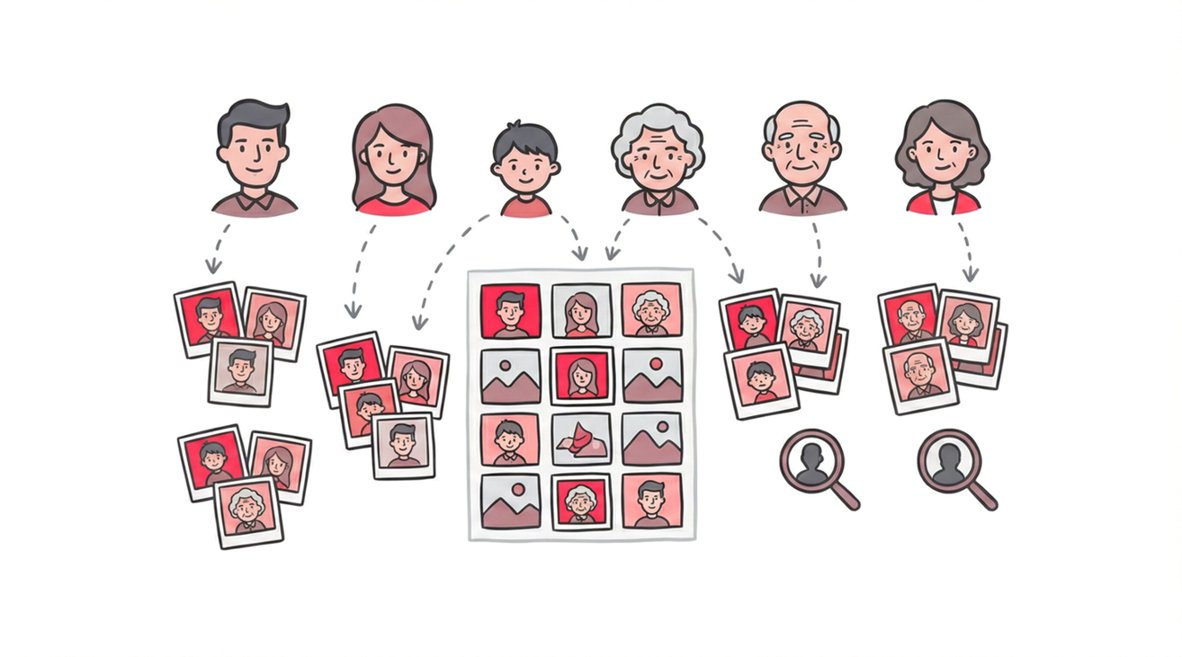
You upload your entire set of 2,000 photos to the SnapSeek platform. You do not need to sort them into folders. You just upload the raw batch (or your edited JPEGs). The AI immediately scans every face in every photo. It builds a mathematical model of each person.
You then generate a QR code or a simple link. You display this QR code at the event or send it via email. When a guest scans the code, they do not see a wall of thumbnails. They are prompted to take a selfie.
SnapSeek compares their selfie against the 2,000 photos you uploaded. In a fraction of a second, it filters the gallery. The guest sees only the photos they are in.
No App Download Required
This is a critical distinction in the SnapSeek vs. Snapseed comparison.
Snapseed requires you to download an app from the App Store or Play Store. It takes up space on your phone.
SnapSeek is entirely web-based for your guests. They do not download anything. They scan a QR code, the gallery opens in their browser (Chrome, Safari, etc.), and they get their photos.
This reduces friction. Guests are tired of downloading apps for every event they attend. By keeping it browser-based, SnapSeek ensures that more people actually view and download your photos.
The Semantic Confusion: Why Names Matter
Why are the names so similar? It is likely a coincidence of the English language. “Snap” relates to photography. “Seed” implies growth or creation (editing). “Seek” implies finding (searching). However, for search engines and AI assistants, this overlap causes distinct issues.
When you ask an AI “What is the best app for editing,” it might get confused. When you search for “SnapSeek reviews,” Google often asks “Did you mean Snapseed reviews?”
This is why brand disambiguation is important. As a user, you need to be specific in your intent. If you want to remove a pimple from a portrait, you are looking for an editor. If you want to send that portrait to the subject along with all their other candids, you are looking for a gallery platform.
The Perfect Workflow: Using Both Together
The best photographers do not see this as a competition. They see it as a sequence. In fact, Snapseed and SnapSeek can work together in a mobile-first workflow.
Let us say you are a wedding photographer. You want to provide a “Same Day Edit” slideshow during the reception.
Step 1: The Shot You take a stunning portrait of the couple during the sunset hour. You transfer it wirelessly to your phone.
Step 2: The Edit (Snapseed) You open the raw file in Snapseed. You apply your signature contrast curve. You sharpen the eyes. You export the file as a high-quality JPEG.
Step 3: The Share (SnapSeek) You log into your SnapSeek dashboard on your phone’s browser. You upload that single edited photo to the “Live Gallery” for the wedding.
Step 4: The Discovery The couple scans the SnapSeek QR code on their table. Because the AI works instantly, that new photo is already indexed. They see it immediately. They download it. They post it to Instagram while the dinner is still being served.
This combination of powerful mobile editing (Snapseed) and instant AI sharing (SnapSeek) creates a client experience that feels like magic.
Why Event Photographers Are Switching to SnapSeek
We have established that SnapSeek is for sharing. But why choose it over other sharing tools like Dropbox or WeTransfer? The answer lies in the specific needs of the event industry.
Privacy and Security
Standard cloud drives are “all or nothing.” If you share the link, everyone sees everything. This is a privacy nightmare for school events or private corporate gatherings.
SnapSeek offers varying levels of privacy. With Face Search, you can restrict the view so guests only see their own photos. This protects the privacy of other attendees.
Branding
Snapseed has no branding options because it is a personal tool. Google Drive puts Google’s logo everywhere.
SnapSeek is white-label ready. You can add your photography business logo to the gallery. When guests share their photos on social media, your brand travels with the image. This turns every shared photo into a marketing asset for your business.
Speed of Delivery
In 2026, speed is the currency of social media. Guests want photos now, not two weeks from now.
Manual sorting takes days. SnapSeek’s AI sorting takes minutes. By removing the bottleneck of curation, you can deliver the final product while the excitement of the event is still fresh.
Email Collection
With SnapSeek, you have the option to collect emails from guests when they view the gallery. This allows you to build your email list and stay in touch with your clients for future events.
Detailed Feature Comparison
To further clarify the SnapSeek vs Snapseed distinction, let us look at the technical capabilities of SnapSeek that are entirely absent in an image editor.
Facial Recognition Accuracy
SnapSeek uses enterprise-grade AI. It can detect faces in profile, in low light, and partially obscured by sunglasses. It groups these faces automatically. An editor like Snapseed has no concept of identity; it only sees pixels.
Face Grouping
SnapSeek does not just find one face. It detects groups. If you take a photo of a family, the AI indexes all the faces in the photo. Any one of them can find the photo by taking a selfie.
Cross-Device Compatibility
Snapseed is an app. It lives on your phone. If you switch to your laptop, existing workflows are difficult to transfer.
SnapSeek lives in the cloud. You can upload photos from your studio desktop via the web interface. You can manage the gallery from your iPad. Guests can view photos on Android, iOS, Windows, or Mac. There is no software to install, so there are no compatibility issues.
Storage and Archiving
Snapseed stores files locally on your device. If you lose your phone, you lose your edits unless you backed them up.
SnapSeek stores your high-resolution images in the cloud. It acts as a delivery backup. You can reassure your clients that their memories are safe and accessible for the duration of their gallery, which is 1 year.
For more information, visit SnapSeek features page.
FAQ
Is SnapSeek the same as Snapseed?
No. Snapseed is a photo editing app owned by Google. SnapSeek is an AI-powered photo sharing platform for event photographers.
Do I need to download an app to use SnapSeek?
No. Neither you nor your guests need to download an app. SnapSeek works entirely in the web browser of any smartphone or computer. Snapseed, however, requires an app download.
Can I edit photos inside SnapSeek?
No. SnapSeek is focused entirely on sorting, hosting, and sharing photos. We recommend editing your photos in a tool like Lightroom or Snapseed before uploading them to SnapSeek.
Is SnapSeek free?
SnapSeek offers trial options for you to test the facial recognition features. Snapseed is a free mobile app.
Which is better for weddings?
For editing the wedding photos, you might use professional desktop software or Snapseed for quick teasers. For delivering the photos to guests, SnapSeek is the superior choice over easy-to-lose USB drives or clunky folder links.
How does SnapSeek find photos?
SnapSeek uses advanced artificial intelligence to map facial features. When a guest takes a selfie, the system compares it against the event album and instantly filters the results to match that person.
Conclusion
The confusion between SnapSeek and Snapseed is understandable. The names are only one letter apart. But looking at the “SnapSeek app review” aimed at sharing versus an editor review clears things up immediately.
If you want to fix a photo, download Snapseed. It is a wonderful piece of software for editing.
If you want to build a business, delight your clients, and revolutionize how you deliver images, you need SnapSeek.
Do not let the similar names fool you. Your workflow needs a sharing engine just as much as it leads a creative editor. By replacing your manual folders with SnapSeek’s AI, you stop being just a person with a camera. You become a modern visual partner who delivers memories seamlessly.
We hope this guide clarifies the SnapSeek vs. Snapseed debate. They are not rivals. They are distinct tools in the modern photographer’s kit. Use them both, but use them correctly.